
Download Bytelearn – AI‑Powered Math Tutoring Platform, Free & Secure
Overview of Bytelearn
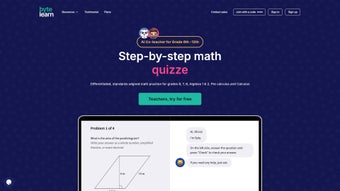
Bytelearn is a cloud‑native, web‑based math tutoring platform that merges artificial‑intelligence problem solving with on‑demand human expertise. The service is built for learners ranging from elementary school students mastering basic operations to university scholars tackling multivariable calculus. When a user submits a problem—typed, pasted, or captured from a handwritten photo—the AI engine instantly parses the input, generates a step‑by‑step solution, and displays the work in high‑resolution LaTeX formatting.
If the learner needs deeper clarification, a single click summons a certified tutor who can explain each step via text chat or video, offering personalized guidance that adapts to the student’s pace and learning style. The interface follows a minimalist design philosophy: a central input field, a dynamic solution pane, and a side panel for notes, saved problems, and quick access to practice sets. By leveraging modern browser technologies (JavaScript, WebGL, HTML5), Bytelearn delivers consistent performance across desktops, tablets, and smartphones without requiring any software download.
Security is baked into the platform through end‑to‑end TLS encryption, GDPR and FERPA compliance, and strict data‑handling policies that ensure user information never leaves the secure cloud environment. Pricing is tiered, with a generous free plan that covers a handful of daily queries and optional premium subscriptions that unlock unlimited AI solves, priority tutor access, and advanced analytics. Whether a student is stuck on a homework problem, preparing for a timed exam, or simply looking to sharpen mathematical fluency, Bytelearn offers an always‑available, affordable, and secure solution that turns confusion into confidence.
Key Features, Benefits, and Drawbacks
Core Feature Set
- AI‑Driven Solver: Real‑time interpretation of typed, pasted, or photographed equations, delivering detailed, step‑by‑step explanations.
- Live Tutor Overlay: Seamless transition from AI output to a human tutor who can provide video or text guidance on demand.
- Multi‑Platform Access: Fully responsive web app works on Windows, macOS, Chrome OS, Android, and iOS browsers.
- Adaptive Learning Paths: Tracks performance, identifies weak areas, and recommends targeted practice problems.
- Rich Math Rendering: Uses LaTeX and SVG graphics for clear, publication‑quality notation and dynamic graphs.
- Secure Data Handling: TLS 1.3 encryption, GDPR & FERPA compliance, and no third‑party data selling.
- Offline Mode (Beta): Allows users to save problems locally and sync results when a connection is restored.
- Affordable Subscription Model: Free tier with limited daily queries and low‑cost premium plans for unlimited access.
- Instant Feedback Loop: Immediate correctness checks, hints, and alternative solution methods without revealing answers outright.
- LMS Integration: API hooks for Canvas, Moodle, Google Classroom, and other learning management systems.
Pros
- Speed: AI generates solutions within seconds, eliminating wait times.
- Human Touch: Live tutors add empathy and deeper conceptual explanations.
- Device Flexibility: Consistent experience on desktop, tablet, and mobile.
- Cost‑Effective: Free tier provides real value; premium plans are competitively priced.
- Privacy‑First: Robust encryption and compliance with educational data regulations.
- Continuous Improvement: Monthly algorithm updates and expanding tutor pool keep the service cutting‑edge.
Cons
- Internet Requirement: Core AI processing depends on an online connection; offline mode is still experimental.
- Subject Limitation: Currently focuses exclusively on mathematics; no support for other STEM subjects.
- Handwritten Input Variability: Messy handwriting may need multiple scans for accurate recognition.
- Tutor Availability Peaks: During high‑traffic periods, live tutors may experience short queues.
- Browser Compatibility: Very old browsers (e.g., Internet Explorer 11) are not supported, requiring a modern browser.
Installation, Usage Instructions, and System Compatibility
Zero‑Installation Setup
Bytelearn is delivered as a progressive web application (PWA), which means there is no traditional installer for Windows, macOS, or Linux. Users simply navigate to www.bytelearn.com using any up‑to‑date browser (Chrome, Edge, Firefox, Safari) and register with an email address or single sign‑on via Google or Microsoft. After confirming the account, the dashboard appears instantly, ready for problem solving.
Creating a Shortcut for Mobile
Mobile users can tap the browser’s “Add to Home Screen” option. This action creates a full‑screen shortcut that behaves like a native app while still running entirely in the cloud. The PWA approach ensures that updates are applied automatically—no manual downloads or version checks are required.
Step‑by‑Step Usage
1. Log In: Enter credentials or use SSO.
2. Enter a Problem: Type the equation, paste LaTeX code, or upload a clear photo of handwritten work.
3.
Review AI Solution: The solution pane displays a detailed, numbered breakdown with visual aids.
4. Request Live Help (optional): Click “Live Tutor” to launch a chat or video session where a tutor can walk through each step, suggest alternative methods, or answer follow‑up questions.
5. Save & Tag: Store the problem in your personal library, add notes, and assign tags for future review.
6.
Practice: Use the adaptive learning engine to generate custom practice sets based on recent performance.
Operating System Compatibility
Bytelearn works on any device that supports a modern web browser, including Windows 10/11, macOS Ventura and later, Chrome OS, Android 8.0+, and iOS 13+. Because the platform relies on standard web technologies, it automatically scales to different screen resolutions, ensuring a consistent experience on 13‑inch laptops, 15‑inch monitors, or 6‑inch smartphones.
Performance Tips
For optimal speed, use a broadband connection of at least 5 Mbps. Clear your browser cache weekly to avoid loading outdated scripts, and enable cookies so Bytelearn can remember your preferences and saved problems. Premium subscribers benefit from priority server routing, which reduces latency during peak study hours.
Frequently Asked Questions and Final Thoughts
Is there a completely free version of Bytelearn?
Yes. The free tier allows up to five AI‑generated solutions per day and limited live‑tutor access during off‑peak hours, making it ideal for casual learners or those testing the platform before upgrading.
How does Bytelearn protect my personal data?
All traffic between your browser and Bytelearn’s servers is encrypted with TLS 1.3. User profiles, saved problems, and payment details are stored in a GDPR‑ and FERPA‑compliant cloud, and the company does not sell personal data to third parties.
Can I use Bytelearn on a school network that has strict firewalls?
Bytelearn operates over standard HTTPS (port 443), which is typically allowed on most institutional firewalls. If access is blocked, ask your IT administrator to whitelist www.bytelearn.com.
What math topics are covered beyond basic arithmetic?
The platform supports algebra, geometry, trigonometry, calculus, statistics, and discrete mathematics. Each subject includes problem generators, visual graphing tools, and curated tutor expertise.
How do I upgrade to a premium plan?
Log in, click the “Upgrade” button on your dashboard, and select a monthly or annual subscription. Payments are processed securely via Stripe or PayPal, and the upgrade takes effect immediately, unlocking unlimited AI solves and priority tutor access.
Final Verdict and How to Get Started
Bytelearn distinguishes itself in the crowded ed‑tech space by delivering AI‑driven speed together with the nuance of live tutoring, all within a single, secure web platform. Its broad device compatibility, intuitive workflow, and transparent pricing make it a compelling choice for students, parents, and educators seeking on‑demand math assistance. While the current reliance on an internet connection and a focus solely on mathematics are modest limitations, the roadmap promises expanded subject coverage and a more robust offline mode. For anyone looking to boost confidence in math, reduce study friction, and access expert help whenever it’s needed, Bytelearn offers a ready‑to‑use, affordable solution.
Start Your Free Trial Today and experience the seamless blend of AI precision and human expertise that turns challenging problems into learning opportunities.



.png)



